🎯 The Tasks: Planning, Teaching, and Managing
I selected two common weekly tasks:
- Classroom Prep for K–8 General Music Classes
Tasks include setting timers, writing learning objectives, displaying instructions, and embedding visual aids, typically using a combination of whiteboards, timers, and multiple websites.
- Managing My Private Music Studio
This involves scheduling lessons, sending reminders, logging attendance, invoicing, and communicating with families, typically done through emails, Google Calendar, and spreadsheets.
🧰 The Tools
1. Classroomscreen.com
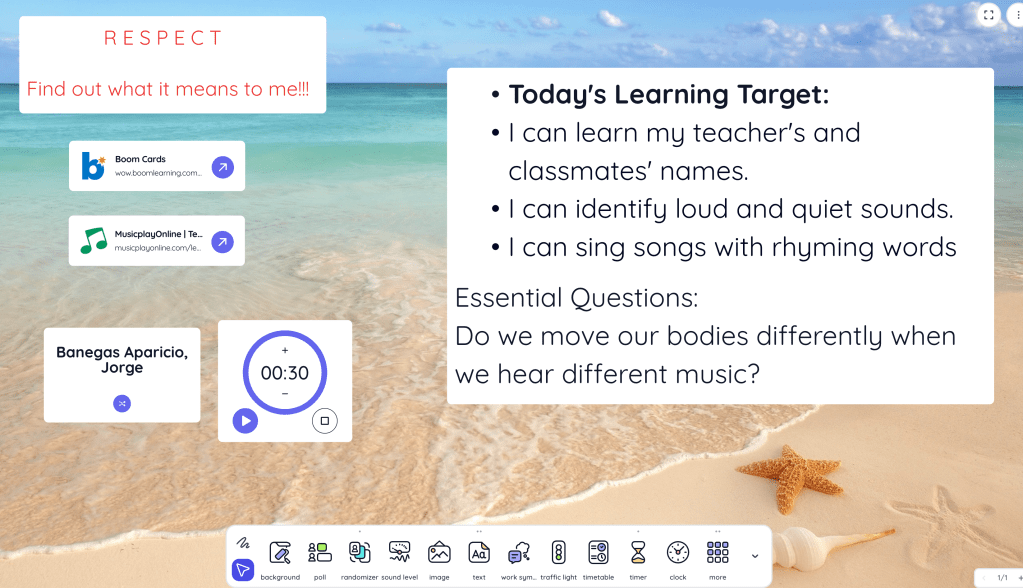
A browser-based classroom management tool that offers timers, traffic lights, text boxes, random name pickers, work symbols, and embedded YouTube videos all in one screen.
2. MyMusicStaff.com
An all-in-one studio management platform tailored for independent music educators. It handles scheduling, billing, communication, student notes, expense tracking, and more.
🧪 Testing the Tools: Metrics & Results
I performed each task three times: manually, with Classroomscreen or MyMusicStaff, and tracked the time, clicks, and ease of use.
| Task/Tool | Time Spent | Keystrokes/Clicks | Training Time | Output Quality |
| Manual – School | ~30 min | 60+ | 0 mins | Fragmented setup using multiple tabs |
| Classroomscreen | ~10 min | 20 | 15 mins | Clean, engaging, all-in-one display |
| Manual – Studio | ~45 min | 70+ | 0 mins | Disorganized, risk of errors |
| MyMusicStaff | ~15 min | 25 | 45 mins | Professional, automated, efficient |

📚 What the Research Says
According to Gillett-Swan (2017), tools that reduce cognitive overload allow teachers to focus more on meaningful interactions with students. Classroomscreen supports this by consolidating classroom visuals into one simple interface. Meanwhile, Alammary et al. (2021) emphasize the importance of user-centered design in digital tools. MyMusicStaff is clearly built for music educators, with studio-specific features like automated billing, attendance logs, and student portals.
🔍 Tool Analysis
- Classroomscreen saves me time every morning by giving me one space to organize the day’s materials. I can prep visuals, objectives, and cues in advance. The drag-and-drop simplicity keeps transitions smooth and student engagement high.
- MyMusicStaff transformed how I run my private studio. I can schedule lessons, record attendance, and invoice parents in minutes. It even sends automated reminders and provides a client portal, features that enhance my professionalism and client satisfaction.
✅ My Recommendation
Both tools serve very different purposes, but they are equally invaluable in their domains. If you’re a classroom teacher looking to simplify your tech setup, Classroomscreen is a game-changer. If you run a private music studio, MyMusicStaff is worth every penny. Together, they save me nearly two hours each week and help me show up better for my students and my business.
References
Alammary, A., Alhazmi, A. K., & Alqahtani, A. Y. (2021). Evaluating digital tools for teaching and learning: The importance of user-centered design. Education and Information Technologies, 26(3), 3325–3342. https://doi.org/10.1007/s10639-020-10410-4
Gillett-Swan, J. (2017). The challenges of online learning: Supporting and engaging the isolated learner. Journal of Learning Design, 10(1), 20–30. https://doi.org/10.5204/jld.v9i3.293

Leave a comment